> ## Documentation Index
> Fetch the complete documentation index at: https://langchain-5e9cc07a-preview-docscl-1781043860-248c713.mintlify.site/llms.txt
> Use this file to discover all available pages before exploring further.
# Harness capabilities
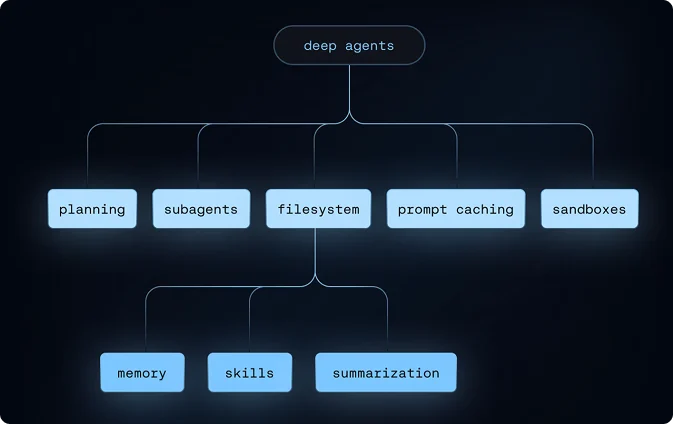
A Deep Agents harness provides four categories of built-in capabilities that make building long-running, reliable agents easier:
Tools, virtual filesystem, optional sandbox, and REPL (interpreter)
Skills, memory, summarization, context offloading, and prompt caching
Subagent spawning and task planning
Human-in-the-loop approval and interrupts
Alongside these four components, [harness profiles](#harness-profiles) let you package per-model configuration into reusable bundles.
 ## Execution environment
The execution environment is where an agent acts. It has four layers:
* **[Tools](#tools)**: custom functions, APIs, and databases the agent can call
* **[Virtual filesystem](#virtual-filesystem-access)**: file tools backed by pluggable backends
* **[Filesystem permissions](#filesystem-permissions)**: declarative access control over which paths agents can read or write
* **[Code execution](#code-execution)**: sandboxed shell execution and an in-process JavaScript interpreter
### Tools
Pass any Python callable, LangChain tool, or tool dict to `create_deep_agent` via the `tools=` parameter. These are the domain-specific actions your agent can take—web search, database queries, API calls, or any function you define.
```python theme={null}
from deepagents import create_deep_agent
agent = create_deep_agent(
model="anthropic:claude-sonnet-4-6",
tools=[search, fetch_page, run_query],
)
```
For more information on defining custom tools, using MCP servers, and the full list of built-in harness tools, see [Tools](/oss/javascript/deepagents/tools).
### Virtual filesystem access
The harness provides a configurable virtual filesystem which can be backed by different pluggable backends.
The backends support the following file system operations:
| Tool | Description |
| ------------ | ------------------------------------------------------------------------------------------------------------------------------------------------------------------------------------------------------------------------ |
| `ls` | List files in a directory with metadata (size, modified time) |
| `read_file` | Read file contents with line numbers, supports offset/limit for large files. Also supports returning multimodal content blocks for non-text files (images, video, audio, and documents). See supported extensions below. |
| `write_file` | Create new files |
| `edit_file` | Perform exact string replacements in files (with global replace mode) |
| `glob` | Find files matching patterns (e.g., `**/*.py`) |
| `grep` | Search file contents with multiple output modes (files only, content with context, or counts) |
| `execute` | Run shell commands in the environment (available with [sandbox backends](/oss/javascript/deepagents/sandboxes) only) |
| Type | Extensions |
| ------------------------------------------------------ | ------------------------------------------------------------------------- |
| [Image](/oss/javascript/langchain/messages#multimodal) | `.png`, `.jpg`, `.jpeg`, `.gif`, `.webp`, `.heic`, `.heif` |
| [Video](/oss/javascript/langchain/messages#multimodal) | `.mp4`, `.mpeg`, `.mov`, `.avi`, `.flv`, `.mpg`, `.webm`, `.wmv`, `.3gpp` |
| [Audio](/oss/javascript/langchain/messages#multimodal) | `.wav`, `.mp3`, `.aiff`, `.aac`, `.ogg`, `.flac` |
| [File](/oss/javascript/langchain/messages#multimodal) | `.pdf`, `.ppt`, `.pptx` |
To hide the filesystem tools listed above from the model, register a [harness profile](#harness-profiles) with `excluded_tools`:
```python theme={null}
from deepagents import HarnessProfile, register_harness_profile
register_harness_profile(
"anthropic:claude-sonnet-4-6",
HarnessProfile(
excluded_tools=frozenset(
{"ls", "read_file", "write_file", "edit_file", "glob", "grep"}
),
),
)
```
Removing [`FilesystemMiddleware`](https://reference.langchain.com/javascript/deepagents/middleware/createFilesystemMiddleware) itself via `excluded_middleware` is intentionally rejected—it is required scaffolding in the [default middleware stack](/oss/javascript/deepagents/customization#default-stack-main-agent). Use `excluded_tools` to hide only the model-visible tool surface and leave the middleware in place. To remove the `task` tool, see [Running without subagents](/oss/javascript/deepagents/subagents#running-without-subagents).
The virtual filesystem is used by several other harness capabilities such as skills, memory, code execution, and context management.
You can also use the file system when building custom tools and middleware for Deep Agents.
For more information, see [backends](/oss/javascript/deepagents/backends).
### Filesystem permissions
The harness supports declarative permission rules that control which files and directories the agent can read or write. Permissions apply to the built-in filesystem tools listed above and are evaluated in declaration order with first-match-wins semantics.
**How it works:**
* Pass a list of rules to `permissions=` when creating the agent
* Each rule specifies `operations` (`"read"`, `"write"`), `paths` (glob patterns), and `mode` (`"allow"` or `"deny"`)
* The first matching rule wins. If no rule matches, the operation is allowed.
**Why it's useful:**
* Restrict agents to specific directories (e.g., `/workspace/`)
* Protect sensitive files (e.g., `.env`, credentials)
* Give subagents narrower access than the parent agent
Permissions do not apply to [sandbox backends](/oss/javascript/deepagents/sandboxes), which support arbitrary command execution via the `execute` tool. For custom validation logic, use [backend policy hooks](/oss/javascript/deepagents/backends#add-policy-hooks).
For the full rule structure, examples, and subagent inheritance, see [Permissions](/oss/javascript/deepagents/permissions).
### Code execution
Deep Agents supports code execution in two ways:
* [Sandbox backends](/oss/javascript/deepagents/sandboxes) expose an `execute` tool for shell commands in an isolated environment.
* [Interpreters](/oss/javascript/deepagents/interpreters) add an `eval` tool that runs JavaScript in a scoped QuickJS runtime.
Use sandbox backends when the agent needs to install dependencies, run tests, call CLIs, or work with an operating-system filesystem. Sandbox backends implement the `SandboxBackendProtocolV2`; when detected, the harness adds the `execute` tool to the agent's available tools.
Use interpreters when the agent needs a lightweight programmable layer for loops, batching, deterministic data transformations, or programmatic tool calling. Interpreters do not provide shell access, package installs, or filesystem and network access.
For sandbox setup, providers, and file transfer APIs, see [Sandboxes](/oss/javascript/deepagents/sandboxes). For the QuickJS runtime and programmatic tool calling, see [Interpreters](/oss/javascript/deepagents/interpreters).
## Context management
The context management component controls what the agent knows, how long it can operate within token limits, and what it retains across sessions. It has four layers:
* **[Skills](#skills)**—on-demand domain knowledge loaded progressively from skill files
* **[Memory](#memory)**—persistent instructions and preferences loaded at startup from `AGENTS.md` files
* **[Summarization and context offloading](#summarization-and-context-offloading)**—automatic compression of conversation history and large tool results
* **[Prompt caching](#prompt-caching)**—static prompt sections are cache-eligible to speed up inference and reduce cost on supported models
### Skills
The harness supports skills that provide specialized workflows and domain knowledge to your deep agent.
**How it works:**
* Skills follow the [Agent Skills standard](https://agentskills.io/)
* Each skill is a directory containing a `SKILL.md` file with instructions and metadata
* Skills can include additional scripts, reference docs, templates, and other resources
* Skills use progressive disclosure—they are only loaded when the agent determines they're useful for the current task
* Agent reads frontmatter from each `SKILL.md` file at startup, then reviews full skill content when needed
**Why it's useful:**
* Reduces token usage by only loading relevant skills when needed
* Bundles capabilities together into larger actions with additional context
* Provides specialized expertise without cluttering the system prompt
* Enables modular, reusable agent capabilities
For more information, see [Skills](/oss/javascript/deepagents/skills).
### Memory
The harness supports persistent memory files that provide extra context to your deep agent across conversations.
These files often contain general coding style, preferences, conventions, and guidelines that help the agent understand how to work with your codebase and follow your preferences.
**How it works:**
* Uses [`AGENTS.md` files](https://agents.md/) to provide persistent context
* Memory files are always loaded (unlike skills, which use progressive disclosure)
* Pass one or more file paths to the `memory` parameter when creating your agent
* Files are stored in the agent's backend (StateBackend, StoreBackend, or FilesystemBackend)
* The agent can update memory based on your interactions, feedback, and identified patterns
**Why it's useful:**
* Provides persistent context that does not need to be re-specified each conversation
* Useful for storing user preferences, project guidelines, or domain knowledge
* Always available to the agent, ensuring consistent behavior
For configuration details and examples, see [Memory](/oss/javascript/deepagents/customization#memory).
### Summarization and context offloading
The harness manages context so deep agents can handle long-running tasks within token limits while retaining the information they need.
**How it works:**
* **Input context**—System prompt, memory, skills, and tool prompts shape what the agent knows at startup
* **Compression**—Built-in offloading and summarization keep context within window limits as tasks progress
* **Isolation**—Subagents quarantine heavy work and return only results (see [Delegation](#delegation))
* **Long-term memory**—Persistent storage across threads via the virtual filesystem
**Why it's useful:**
* Enables multi-step tasks that exceed a single context window
* Keeps the most relevant information in scope without manual trimming
* Reduces token usage through automatic summarization and offloading
For configuration details, see [Context engineering](/oss/javascript/deepagents/context-engineering).
### Prompt caching
For Anthropic models, `create_deep_agent` automatically applies prompt caching to static sections of the system prompt—the base agent instructions, memory, and skill content that repeat on every turn. This avoids reprocessing the same tokens across calls, reducing both latency and cost on long-running agents.
Prompt caching is enabled by default when using an Anthropic model. No configuration is required.
For other providers, see [Middleware integrations](/oss/javascript/integrations/middleware#official-integrations) for available provider-specific caching middleware.
## Delegation
The delegation component enables agents to break large problems into smaller, parallelizable units of work. It has two layers:
* **[Task planning](#task-planning)**: a built-in `write_todos` tool for structured task tracking
* **[Subagents](#subagents)**: ephemeral child agents that handle isolated subtasks
### Task planning
The harness provides a `write_todos` tool that agents can use to maintain a structured task list.
**Features:**
* Track multiple tasks with statuses (`'pending'`, `'in_progress'`, `'completed'`)
* Persisted in agent state
* Helps agent organize complex multi-step work
* Useful for long-running tasks and planning
### Subagents
The harness allows the main agent to create ephemeral "subagents" for isolated multi-step tasks.
**Why it's useful:**
* **Context isolation**—Subagent's work does not clutter main agent's context
* **Parallel execution**—Multiple subagents can run concurrently
* **Specialization**—Subagents can have different tools and configurations
* **Token efficiency**—Large subtask context is compressed into a single result
**How it works:**
* Main agent has a `task` tool
* When invoked, it creates a fresh agent instance with its own context
* Subagent executes autonomously until completion
* Returns a single final report to the main agent
* Can use [default `general-purpose` subagent](/oss/javascript/deepagents/subagents#default-subagent) (enabled by default) or add [custom subagents](/oss/javascript/deepagents/subagents#custom-subagents)
* Subagents are stateless (cannot send multiple messages back)
To run an agent without the `task` tool, see [Running without subagents](/oss/javascript/deepagents/subagents#running-without-subagents). Do not try removing [`SubAgentMiddleware`](https://reference.langchain.com/javascript/deepagents/middleware/createSubAgentMiddleware) via `excluded_middleware`—that is intentionally rejected. Instead, disable the auto-added subagent via the [harness profile](#harness-profiles) and pass no synchronous subagents via `subagents=`. Async subagents are unaffected. See the [default middleware stack](/oss/javascript/deepagents/customization#default-stack-main-agent) for the full ordering.
For more information, see [Subagents](/oss/javascript/deepagents/subagents).
## Steering
The steering component gives humans control over agent behavior at runtime.
### Human-in-the-loop
The harness can pause agent execution at specified tool calls to allow human approval or modification. This feature is opt-in via the `interrupt_on` parameter.
**Configuration:**
* Pass `interrupt_on` to `create_deep_agent` with a mapping of tool names to interrupt configurations
* Example: `interrupt_on={"edit_file": True}` pauses before every edit
* You can provide approval messages or modify tool inputs when prompted
**Why it's useful:**
* Safety gates for destructive operations
* User verification before expensive API calls
* Interactive debugging and guidance
For more information, see [Human-in-the-loop](/oss/javascript/deepagents/human-in-the-loop).
## Harness profiles
The harness can apply a declarative configuration bundle (a `HarnessProfile`) whenever a given provider or model is selected. Profiles tune runtime behavior after the model is built, without requiring per-agent setup code.
**How it works:**
* Register a profile under a provider name (`"openai"`) or a `provider:model` key (`"openai:gpt-5.4"`)
* `create_deep_agent` looks up and applies the profile when resolving the model
* Provider-level and model-level profiles merge at resolution time
**Why it's useful:**
* Package per-provider or per-model defaults (system-prompt tweaks, tool overrides, middleware) in one place
* Keep the `create_deep_agent` call site unchanged when switching models
* Ship reusable profiles as plugins via entry points
For the full field list, merge semantics, and plugin packaging, see [Profiles](/oss/javascript/deepagents/profiles).
***
## Execution environment
The execution environment is where an agent acts. It has four layers:
* **[Tools](#tools)**: custom functions, APIs, and databases the agent can call
* **[Virtual filesystem](#virtual-filesystem-access)**: file tools backed by pluggable backends
* **[Filesystem permissions](#filesystem-permissions)**: declarative access control over which paths agents can read or write
* **[Code execution](#code-execution)**: sandboxed shell execution and an in-process JavaScript interpreter
### Tools
Pass any Python callable, LangChain tool, or tool dict to `create_deep_agent` via the `tools=` parameter. These are the domain-specific actions your agent can take—web search, database queries, API calls, or any function you define.
```python theme={null}
from deepagents import create_deep_agent
agent = create_deep_agent(
model="anthropic:claude-sonnet-4-6",
tools=[search, fetch_page, run_query],
)
```
For more information on defining custom tools, using MCP servers, and the full list of built-in harness tools, see [Tools](/oss/javascript/deepagents/tools).
### Virtual filesystem access
The harness provides a configurable virtual filesystem which can be backed by different pluggable backends.
The backends support the following file system operations:
| Tool | Description |
| ------------ | ------------------------------------------------------------------------------------------------------------------------------------------------------------------------------------------------------------------------ |
| `ls` | List files in a directory with metadata (size, modified time) |
| `read_file` | Read file contents with line numbers, supports offset/limit for large files. Also supports returning multimodal content blocks for non-text files (images, video, audio, and documents). See supported extensions below. |
| `write_file` | Create new files |
| `edit_file` | Perform exact string replacements in files (with global replace mode) |
| `glob` | Find files matching patterns (e.g., `**/*.py`) |
| `grep` | Search file contents with multiple output modes (files only, content with context, or counts) |
| `execute` | Run shell commands in the environment (available with [sandbox backends](/oss/javascript/deepagents/sandboxes) only) |
| Type | Extensions |
| ------------------------------------------------------ | ------------------------------------------------------------------------- |
| [Image](/oss/javascript/langchain/messages#multimodal) | `.png`, `.jpg`, `.jpeg`, `.gif`, `.webp`, `.heic`, `.heif` |
| [Video](/oss/javascript/langchain/messages#multimodal) | `.mp4`, `.mpeg`, `.mov`, `.avi`, `.flv`, `.mpg`, `.webm`, `.wmv`, `.3gpp` |
| [Audio](/oss/javascript/langchain/messages#multimodal) | `.wav`, `.mp3`, `.aiff`, `.aac`, `.ogg`, `.flac` |
| [File](/oss/javascript/langchain/messages#multimodal) | `.pdf`, `.ppt`, `.pptx` |
To hide the filesystem tools listed above from the model, register a [harness profile](#harness-profiles) with `excluded_tools`:
```python theme={null}
from deepagents import HarnessProfile, register_harness_profile
register_harness_profile(
"anthropic:claude-sonnet-4-6",
HarnessProfile(
excluded_tools=frozenset(
{"ls", "read_file", "write_file", "edit_file", "glob", "grep"}
),
),
)
```
Removing [`FilesystemMiddleware`](https://reference.langchain.com/javascript/deepagents/middleware/createFilesystemMiddleware) itself via `excluded_middleware` is intentionally rejected—it is required scaffolding in the [default middleware stack](/oss/javascript/deepagents/customization#default-stack-main-agent). Use `excluded_tools` to hide only the model-visible tool surface and leave the middleware in place. To remove the `task` tool, see [Running without subagents](/oss/javascript/deepagents/subagents#running-without-subagents).
The virtual filesystem is used by several other harness capabilities such as skills, memory, code execution, and context management.
You can also use the file system when building custom tools and middleware for Deep Agents.
For more information, see [backends](/oss/javascript/deepagents/backends).
### Filesystem permissions
The harness supports declarative permission rules that control which files and directories the agent can read or write. Permissions apply to the built-in filesystem tools listed above and are evaluated in declaration order with first-match-wins semantics.
**How it works:**
* Pass a list of rules to `permissions=` when creating the agent
* Each rule specifies `operations` (`"read"`, `"write"`), `paths` (glob patterns), and `mode` (`"allow"` or `"deny"`)
* The first matching rule wins. If no rule matches, the operation is allowed.
**Why it's useful:**
* Restrict agents to specific directories (e.g., `/workspace/`)
* Protect sensitive files (e.g., `.env`, credentials)
* Give subagents narrower access than the parent agent
Permissions do not apply to [sandbox backends](/oss/javascript/deepagents/sandboxes), which support arbitrary command execution via the `execute` tool. For custom validation logic, use [backend policy hooks](/oss/javascript/deepagents/backends#add-policy-hooks).
For the full rule structure, examples, and subagent inheritance, see [Permissions](/oss/javascript/deepagents/permissions).
### Code execution
Deep Agents supports code execution in two ways:
* [Sandbox backends](/oss/javascript/deepagents/sandboxes) expose an `execute` tool for shell commands in an isolated environment.
* [Interpreters](/oss/javascript/deepagents/interpreters) add an `eval` tool that runs JavaScript in a scoped QuickJS runtime.
Use sandbox backends when the agent needs to install dependencies, run tests, call CLIs, or work with an operating-system filesystem. Sandbox backends implement the `SandboxBackendProtocolV2`; when detected, the harness adds the `execute` tool to the agent's available tools.
Use interpreters when the agent needs a lightweight programmable layer for loops, batching, deterministic data transformations, or programmatic tool calling. Interpreters do not provide shell access, package installs, or filesystem and network access.
For sandbox setup, providers, and file transfer APIs, see [Sandboxes](/oss/javascript/deepagents/sandboxes). For the QuickJS runtime and programmatic tool calling, see [Interpreters](/oss/javascript/deepagents/interpreters).
## Context management
The context management component controls what the agent knows, how long it can operate within token limits, and what it retains across sessions. It has four layers:
* **[Skills](#skills)**—on-demand domain knowledge loaded progressively from skill files
* **[Memory](#memory)**—persistent instructions and preferences loaded at startup from `AGENTS.md` files
* **[Summarization and context offloading](#summarization-and-context-offloading)**—automatic compression of conversation history and large tool results
* **[Prompt caching](#prompt-caching)**—static prompt sections are cache-eligible to speed up inference and reduce cost on supported models
### Skills
The harness supports skills that provide specialized workflows and domain knowledge to your deep agent.
**How it works:**
* Skills follow the [Agent Skills standard](https://agentskills.io/)
* Each skill is a directory containing a `SKILL.md` file with instructions and metadata
* Skills can include additional scripts, reference docs, templates, and other resources
* Skills use progressive disclosure—they are only loaded when the agent determines they're useful for the current task
* Agent reads frontmatter from each `SKILL.md` file at startup, then reviews full skill content when needed
**Why it's useful:**
* Reduces token usage by only loading relevant skills when needed
* Bundles capabilities together into larger actions with additional context
* Provides specialized expertise without cluttering the system prompt
* Enables modular, reusable agent capabilities
For more information, see [Skills](/oss/javascript/deepagents/skills).
### Memory
The harness supports persistent memory files that provide extra context to your deep agent across conversations.
These files often contain general coding style, preferences, conventions, and guidelines that help the agent understand how to work with your codebase and follow your preferences.
**How it works:**
* Uses [`AGENTS.md` files](https://agents.md/) to provide persistent context
* Memory files are always loaded (unlike skills, which use progressive disclosure)
* Pass one or more file paths to the `memory` parameter when creating your agent
* Files are stored in the agent's backend (StateBackend, StoreBackend, or FilesystemBackend)
* The agent can update memory based on your interactions, feedback, and identified patterns
**Why it's useful:**
* Provides persistent context that does not need to be re-specified each conversation
* Useful for storing user preferences, project guidelines, or domain knowledge
* Always available to the agent, ensuring consistent behavior
For configuration details and examples, see [Memory](/oss/javascript/deepagents/customization#memory).
### Summarization and context offloading
The harness manages context so deep agents can handle long-running tasks within token limits while retaining the information they need.
**How it works:**
* **Input context**—System prompt, memory, skills, and tool prompts shape what the agent knows at startup
* **Compression**—Built-in offloading and summarization keep context within window limits as tasks progress
* **Isolation**—Subagents quarantine heavy work and return only results (see [Delegation](#delegation))
* **Long-term memory**—Persistent storage across threads via the virtual filesystem
**Why it's useful:**
* Enables multi-step tasks that exceed a single context window
* Keeps the most relevant information in scope without manual trimming
* Reduces token usage through automatic summarization and offloading
For configuration details, see [Context engineering](/oss/javascript/deepagents/context-engineering).
### Prompt caching
For Anthropic models, `create_deep_agent` automatically applies prompt caching to static sections of the system prompt—the base agent instructions, memory, and skill content that repeat on every turn. This avoids reprocessing the same tokens across calls, reducing both latency and cost on long-running agents.
Prompt caching is enabled by default when using an Anthropic model. No configuration is required.
For other providers, see [Middleware integrations](/oss/javascript/integrations/middleware#official-integrations) for available provider-specific caching middleware.
## Delegation
The delegation component enables agents to break large problems into smaller, parallelizable units of work. It has two layers:
* **[Task planning](#task-planning)**: a built-in `write_todos` tool for structured task tracking
* **[Subagents](#subagents)**: ephemeral child agents that handle isolated subtasks
### Task planning
The harness provides a `write_todos` tool that agents can use to maintain a structured task list.
**Features:**
* Track multiple tasks with statuses (`'pending'`, `'in_progress'`, `'completed'`)
* Persisted in agent state
* Helps agent organize complex multi-step work
* Useful for long-running tasks and planning
### Subagents
The harness allows the main agent to create ephemeral "subagents" for isolated multi-step tasks.
**Why it's useful:**
* **Context isolation**—Subagent's work does not clutter main agent's context
* **Parallel execution**—Multiple subagents can run concurrently
* **Specialization**—Subagents can have different tools and configurations
* **Token efficiency**—Large subtask context is compressed into a single result
**How it works:**
* Main agent has a `task` tool
* When invoked, it creates a fresh agent instance with its own context
* Subagent executes autonomously until completion
* Returns a single final report to the main agent
* Can use [default `general-purpose` subagent](/oss/javascript/deepagents/subagents#default-subagent) (enabled by default) or add [custom subagents](/oss/javascript/deepagents/subagents#custom-subagents)
* Subagents are stateless (cannot send multiple messages back)
To run an agent without the `task` tool, see [Running without subagents](/oss/javascript/deepagents/subagents#running-without-subagents). Do not try removing [`SubAgentMiddleware`](https://reference.langchain.com/javascript/deepagents/middleware/createSubAgentMiddleware) via `excluded_middleware`—that is intentionally rejected. Instead, disable the auto-added subagent via the [harness profile](#harness-profiles) and pass no synchronous subagents via `subagents=`. Async subagents are unaffected. See the [default middleware stack](/oss/javascript/deepagents/customization#default-stack-main-agent) for the full ordering.
For more information, see [Subagents](/oss/javascript/deepagents/subagents).
## Steering
The steering component gives humans control over agent behavior at runtime.
### Human-in-the-loop
The harness can pause agent execution at specified tool calls to allow human approval or modification. This feature is opt-in via the `interrupt_on` parameter.
**Configuration:**
* Pass `interrupt_on` to `create_deep_agent` with a mapping of tool names to interrupt configurations
* Example: `interrupt_on={"edit_file": True}` pauses before every edit
* You can provide approval messages or modify tool inputs when prompted
**Why it's useful:**
* Safety gates for destructive operations
* User verification before expensive API calls
* Interactive debugging and guidance
For more information, see [Human-in-the-loop](/oss/javascript/deepagents/human-in-the-loop).
## Harness profiles
The harness can apply a declarative configuration bundle (a `HarnessProfile`) whenever a given provider or model is selected. Profiles tune runtime behavior after the model is built, without requiring per-agent setup code.
**How it works:**
* Register a profile under a provider name (`"openai"`) or a `provider:model` key (`"openai:gpt-5.4"`)
* `create_deep_agent` looks up and applies the profile when resolving the model
* Provider-level and model-level profiles merge at resolution time
**Why it's useful:**
* Package per-provider or per-model defaults (system-prompt tweaks, tool overrides, middleware) in one place
* Keep the `create_deep_agent` call site unchanged when switching models
* Ship reusable profiles as plugins via entry points
For the full field list, merge semantics, and plugin packaging, see [Profiles](/oss/javascript/deepagents/profiles).
***
[Connect these docs](/use-these-docs) to Claude, VSCode, and more via MCP for real-time answers.
[Edit this page on GitHub](https://github.com/langchain-ai/docs/edit/main/src/oss/deepagents/harness.mdx) or [file an issue](https://github.com/langchain-ai/docs/issues/new/choose).